

What is the Age Calculator tool?
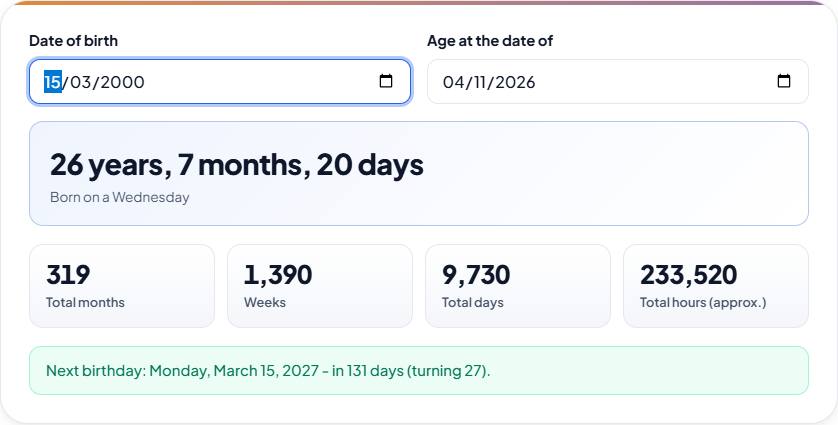
An age calculator works out exactly how old someone is, in years, months and days, from their date of birth. Enter a date of birth to find the exact age in years, months and days. You also get the total number of months, weeks, days and hours lived, the day of the week you were born and a countdown to your next birthday. You can also calculate age on any past or future date.
How to use the Age Calculator tool
- Enter the date of birth in the Date of birth field.
- Leave the Age at the date of field on today's date, or pick any past or future date.
- Read the exact age in years, months and days, with the weekday of birth underneath.
- Check the totals: total months, weeks, total days and total hours (approx.).
- See the next birthday line, which gives its weekday, date, how many days are left and the age being turned.
Features
- Exact age in years, months and days
- Total months, weeks, days and hours
- Countdown to the next birthday
- Day of the week you were born
- Handles leap years and 29 February birthdays
How age is calculated
The calculator counts complete years first, then complete months, then the remaining days, which is the same method used on official forms. Leap years are handled automatically, and people born on 29 February celebrate on 28 February in non-leap years.
When does a month count as complete?
A month is complete once the same day of the month comes round again. If the next month is too short to have that day, its last day counts instead. So someone born on 31 January has completed one month on 28 February (or 29 February in a leap year), and on 1 March they are 1 month and 1 day old. The leftover days are counted from the most recent completed month, so the years, months and days always add up to the dates you entered.
A worked example
Take a date of birth of 15 March 1990 and an "age at" date of 10 November 2026. The last birthday was 15 March 2026, which gives 36 complete years. From there, 15 October 2026 is the seventh complete month, and 10 November is 26 days later, so the age is 36 years, 7 months, 26 days. The same span is 439 total months, 13,389 total days, 1,912 weeks plus 5 days, and about 321,336 hours. The person was born on a Thursday, and the next birthday is Monday 15 March 2027, 125 days away, when they turn 37.
What the totals mean
Total days is the exact number of calendar days between the two dates. Weeks is that number divided by seven, with any leftover days shown in brackets, for example "Weeks (+5 days)". Total months counts complete months only. Total hours is simply total days multiplied by 24, which is why it is marked as approximate: it does not know the time of birth and ignores daylight saving changes.
Use cases
Being able to set the "age at" date makes the calculator useful well beyond working out how old you are today.
- Check whether a child meets a school admission cut-off by setting the "age at" date to the cut-off day.
- Confirm an age limit for an exam, a job application, a visa or a sports category on the deadline date.
- Work out how old a relative was on a past date, such as a wedding or a date on an old document.
- Find the weekday you were born on and how many days remain until your next birthday.
- Get a total number of days or weeks lived for a milestone such as 10,000 days.
Limits and privacy
The calculator works with whole calendar dates, so it does not take the time of birth or time zones into account, and results never shift by a day because of where you are. Today's date comes from your device's clock. Years must have four digits, and the date of birth must be on or before the "age at" date; otherwise an error message explains what to fix. Everything is calculated in your browser as you type: there is no button to press, and the dates you enter are not saved or sent anywhere.
Frequently asked questions
How do I calculate my exact age?
Enter your date of birth and the calculator shows your age in years, months and days as of today, or as of any date you choose. It counts complete years, then complete months, then the remaining days.
How old am I in days, weeks or months?
Enter your date of birth: as well as years, months and days, the age calculator shows the total number of months, weeks and days, plus an approximate number of hours.
What day of the week was I born on?
The age calculator shows it right under your age as soon as you enter your date of birth.
Can I calculate age on a specific date?
Yes. Change the "Age at" date to see how old someone was or will be on that day, which is useful for school admissions and exam eligibility.
How are leap years handled?
Leap years are counted exactly. For a 29 February birthday, the next birthday in a non-leap year is shown as 28 February.
Why are the total hours marked as approximate?
Total hours is total days multiplied by 24. It doesn't know the time of day you were born and ignores clock changes for daylight saving, so it can be out by up to a day's worth of hours.
Can it work out the age of someone not yet born, or a future birthday?
You can set the "age at" date in the future to see how old someone will be then. The date of birth itself must be on or before the "age at" date, so it can't count down to a birth.
Why might another age calculator show a different number of days?
Calculators handle month ends differently. Some treat every month as 30 days, or count the leftover days in another way. This one uses complete calendar months, falling back to the last day of short months, so the years, months and days match the calendar, and total days and weeks are always exact.
Is my date of birth stored?
No. The calculation runs in your browser and nothing is saved or sent anywhere.