

What is the Password Generator tool?
A password generator is a tool that creates random, hard-to-guess passwords from the characters you choose. Create a strong, random password that is almost impossible to guess. Choose the length and which characters to include, and the generator uses your browser's cryptographically secure random number generator. Passwords are never sent to our server.
How to use the Password Generator tool
- Choose a password length (16 or more is recommended).
- Tick the character types to include: uppercase, lowercase, numbers and symbols.
- Click Generate, then Copy to use your new password.
We tested it
Tested on the live site on , with sample files we made for the test.
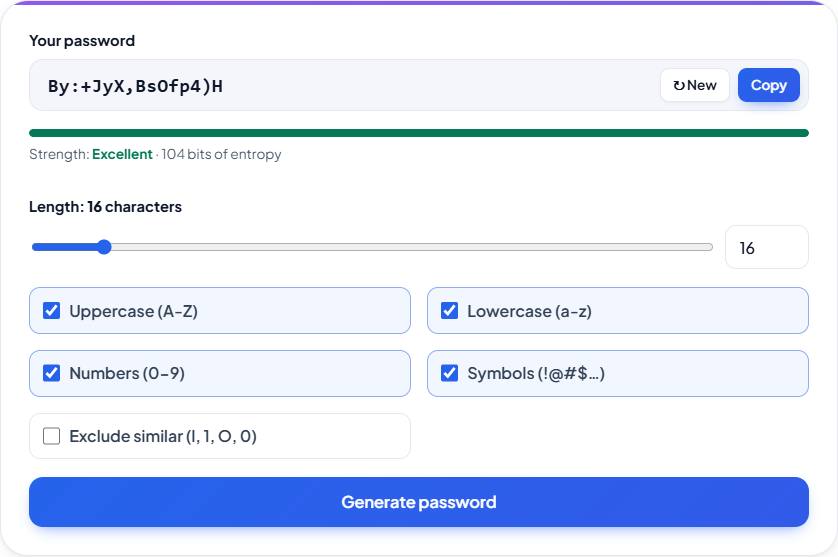
At the default settings, 16 characters using uppercase, lowercase, numbers and symbols, the tool showed 104 bits of entropy. No request sent the password anywhere: the network log showed 0 bytes uploaded.
Features
- Length from 4 to 128 characters
- Uppercase, lowercase, numbers and symbols
- Option to exclude look-alike characters (l, 1, I, O, 0)
- Strength meter based on real entropy
- Uses crypto.getRandomValues - secure and unbiased
What makes a password strong?
Length matters most. Every extra character multiplies the number of possible combinations. A 16 character password using upper and lowercase letters, numbers and symbols has more than 100 bits of entropy, which would take billions of years to brute-force with current hardware.
How do I keep my passwords safe?
Use a different password for every account, store them in a password manager, and turn on two-factor authentication wherever it is offered. Never reuse a password that has appeared in a data breach.
Settings for a strong 16-character password
The defaults already give you one: length 16 with Uppercase (A-Z), Lowercase (a-z), Numbers (0-9) and Symbols ticked. Together those sets hold 26 + 26 + 10 + 27 = 89 characters; the 27 symbols are ! @ # $ % ^ & * ( ) - _ = + [ ] { } ; : , . < > ? / ~. Entropy is length × log2(charset size), so 16 × log2(89) = 16 × 6.48 ≈ 104 bits, which the meter rates Excellent (100 bits or more). Without symbols the set has 62 characters: 16 × 5.95 ≈ 95 bits, rated Strong. Ticking Exclude similar removes I, L, O, i, l, o, 1 and 0, leaving 81 characters and about 101 bits. Why 16? It clears NIST's 15-character minimum, and with all four sets it is the shortest length past 100 bits; 15 characters give about 97. The figure is a slight overestimate, because the generator always includes at least one character of each ticked type.
| Length | Letters and numbers (62 characters) | Letters, numbers and symbols (89 characters) |
|---|---|---|
| 8 | 48 | 52 |
| 12 | 71 | 78 |
| 16 | 95 | 104 |
| 20 | 119 | 130 |
| 32 | 191 | 207 |
Frequently asked questions
Is this password generator safe?
Yes. Passwords are generated in your browser using the Web Crypto API. Nothing is sent to our server, logged or stored.
How do I create a strong password?
Choose a length of at least 15-16 characters, tick uppercase, lowercase, numbers and symbols and press Generate password. Use a different password for every account.
How long should my password be?
At least 15 characters, which is the minimum in NIST's current password guidelines (SP 800-63B), and 16 or more for important accounts like email and banking.
What does "exclude similar characters" do?
It removes characters that look alike, such as l, 1, I, O and 0, so the password is easier to read and type by hand.
What is password entropy?
Entropy measures how unpredictable a password is, in bits. Each extra bit doubles the guesses an attacker needs. 80+ bits is strong and 100+ bits is excellent.
A site won't accept symbols. How long should my password be?
Untick Symbols and add one character. Letters and numbers give 62 possible characters, about 5.95 bits each, so 16 characters reach about 95 bits and 17 characters about 101 bits, back above the 100-bit mark.